What installation contractor software actually needs to do
The category label "contractor management software" doesn't distinguish between platforms built for general construction project management, residential service dispatch, or the specific operational model of a home installation business running independent contractors.
For installation businesses — HVAC, solar, windows, garage storage, flooring, furniture delivery and install — the software has four core jobs:
Scheduling and dispatch at volume. Not just assigning jobs, but managing geo-coverage, contractor availability, skill matching, and real-time adjustments when jobs run long or fall through.
Real-time job tracking. Dispatch needs to know job status without calling anyone. The gap between "contractor is en route" and "the gate code failed and the site contact isn't answering" is where scheduling collapses into something harder to recover from.
Contractor payments and compliance. 1099 independent contractors aren't employees. Split payments, tax compliance, and contractor-specific documentation workflows are either absent from or poorly supported by most off-the-shelf field service management tools.
Administrative closure. Notes, photos, invoicing, and customer sign-off after every job. If documentation takes as long as the job itself, the administrative overhead adds hours of cost across a team running 25+ jobs a day.
The construction software market reached $11.8 billion in 2026, and 93% of companies adopting management solutions report meaningful process improvements. Most of those solutions were designed for general contractors — not for businesses deploying large networks of independent installers on residential and light commercial jobs.
That distinction changes what the software needs to do, and it should shape every comparison below.
Who this software is built for — and when the need becomes urgent
The trigger for evaluating contractor management software is rarely a calm strategic planning session. It's usually one of the following:
- Contractor count crosses 20 and scheduling starts to visibly break down
- The business expands to a second or third state and coordination complexity multiplies
- A major job failure — wrong tech, wrong parts, missed SLA — costs a key client relationship
- A new operations hire joins and refuses to inherit the existing manual patchwork
- The monthly bill for a generic FSM platform keeps climbing while the team uses 30% of its features
At the center of this situation is an operations manager or dispatcher running schedules, managing field crews, handling customer escalations, and compensating for every gap in the current system with institutional knowledge. The stack is taped together — a combination of legacy software, spreadsheets, text message chains, and workarounds that technically functions but creates daily friction at every handoff.
The software search begins when that friction becomes undeniable.
The best software options for home installation contractors in 2026
No single off-the-shelf tool covers every workflow an installation business needs. The comparison below focuses on fit for a specific operational model: 1099 contractors, installation-focused workflows, and growing field teams in the 10–100 contractor range.
| Tool | Best for | Starting price | Key limitation for installation contractors |
|---|---|---|---|
| ServiceTitan | Large HVAC, plumbing, electrical | $125+/user/month | Per-seat pricing penalizes growth; no 1099 contractor compliance modules |
| Jobber | Small residential service businesses | $49–$249/month | Per-seat escalation; limited dispatch complexity at volume |
| Housecall Pro | Budget-conscious small teams | $49–$299/month | Limited multi-location support; light on subcontractor management |
| Buildertrend | General contractors, construction | $199–$999/month | Built for project management, not high-volume field dispatch |
| ContractorForeman | Mid-size general contractors | $49–$249/month | Documentation-heavy; designed for W-2 construction crews |
| FieldPulse | Growing service businesses | $99+/month | Still per-seat; limited configuration for non-standard workflows |
ServiceTitan is the dominant platform in residential trades — HVAC, plumbing, and electrical in particular. Its dispatch board, customer communication tools, and reporting are strong for large operations with consistent service call patterns. For installation businesses, the limitations appear quickly: pricing scales per technician seat, which becomes expensive as a contractor base grows, and the platform has no native support for 1099-specific compliance, split payments, or independent contractor documentation workflows.
Jobber is purpose-built for small residential service businesses — landscaping, cleaning, handyman, and light trades. Its scheduling and invoicing are clean and accessible. At 20+ contractors, Jobber's per-seat pricing model starts creating a growth penalty, and its dispatch capability doesn't scale to businesses managing large volumes of jobs across multiple coverage zones. Subcontractor-specific workflows are not a core design consideration.
Housecall Pro targets budget-conscious small service businesses with a polished mobile experience. For an installation business running a handful of contractors, it covers the basics. At the point where multi-location coordination, subcontractor compliance, or high-volume dispatch complexity becomes the primary challenge, the platform runs into structural limits.
Buildertrend is a strong fit for general contractors managing residential builds and renovations — projects with timelines measured in weeks or months. For installation businesses where jobs are completed same-day and dispatch needs to manage 25–50 jobs per day per region, Buildertrend's project-management orientation doesn't match the actual workflow.
ContractorForeman is a documentation and project management platform designed for mid-size general contractors. It handles budgets, change orders, and crew scheduling for W-2 construction teams well. The documentation overhead that works for a general contractor environment creates friction in an installation business where speed of post-job documentation is a core operational constraint.
FieldPulse targets growing service businesses that have outgrown Jobber but aren't ready for ServiceTitan. The platform is cleaner and more configurable than most of its lower-priced competitors. Per-seat pricing still applies, and the configuration options, while broader, don't extend to the contractor-specific compliance and payment workflows that 1099-heavy installation businesses require.
When your operation has outgrown off-the-shelf software
Several signals indicate that an installation business has reached the point where a generic tool creates liability rather than value.
Scheduling is consistently reactive. The experienced dispatcher is compensating for software limitations with institutional knowledge. When that person is out, the system breaks.
Admin time matches or exceeds field time. Notes, invoicing, and documentation after every job consume as much time as the job itself. At volume, this overhead is material.
Contractor count is growing but software costs are growing faster. Per-seat pricing is producing a bill that scales in the wrong direction relative to operational efficiency.
The compliance and payment workflow doesn't exist in the software. 1099 contractor split payments, tax document tracking, and compliance workflows are managed manually or in a separate system entirely.
Multi-state operations have no standardized process. What works in one region doesn't transfer cleanly to the next, and every expansion adds coordination overhead.
The traditional alternative to buying off-the-shelf is custom software development — historically $80,000–$150,000 in upfront cost, a 9–12 month build timeline, and no guarantee the final product matches what was actually scoped. For most installation businesses at 20–50 contractors, that path has been impractical.
What Fieldera does differently
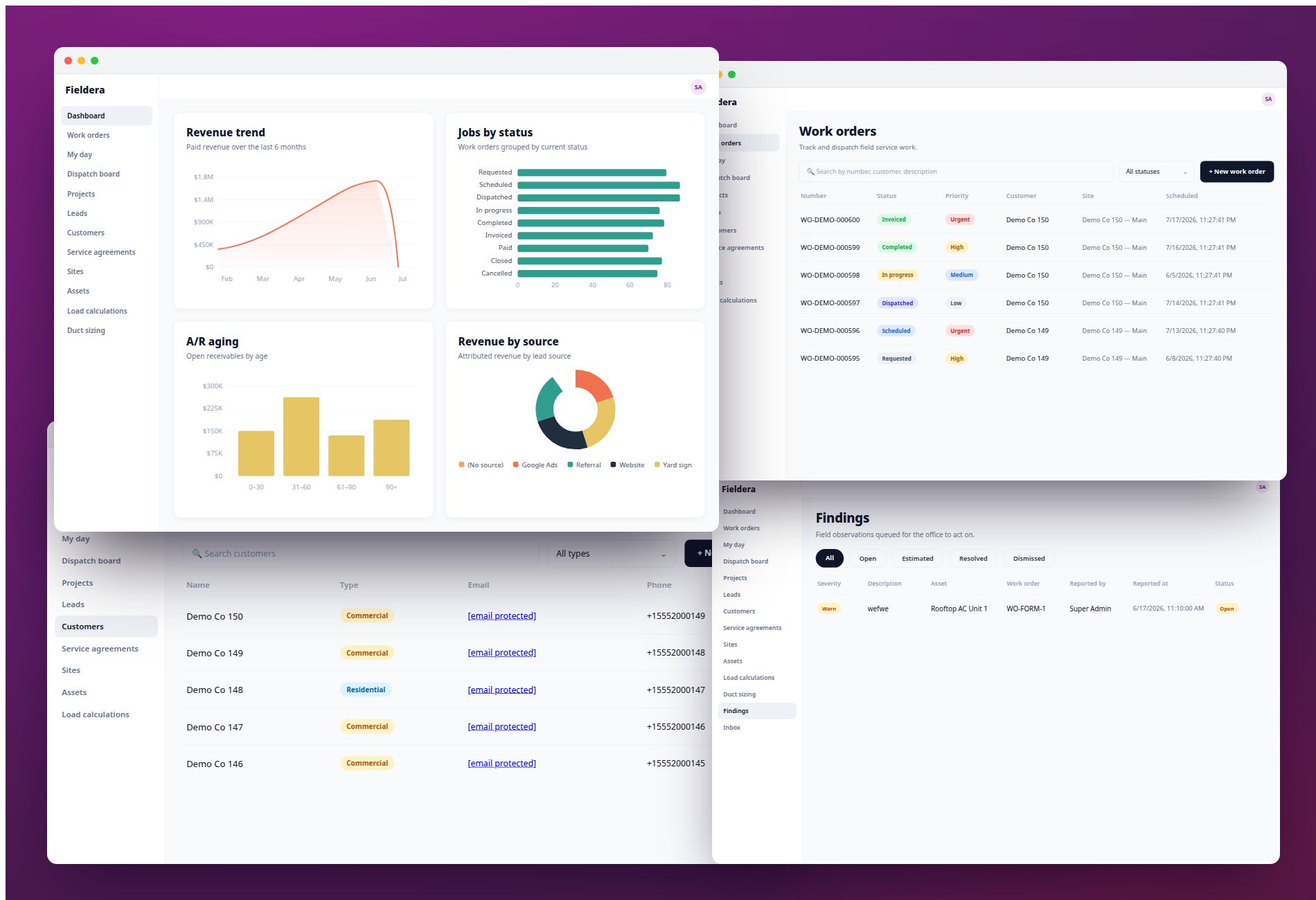
Fieldera is purpose-built for installation businesses that deploy 1099 independent contractors at scale. It's not a generic field service management tool configured to approximate contractor workflows — it's a platform designed specifically around the operational model that most off-the-shelf software treats as an edge case.
Exact-workflow configuration. Fieldera is configured to match the specific dispatch, scheduling, and documentation workflows of the business — not a generic template the team adapts to. Implementation takes weeks, not months, because Fieldera builds from proven FSM patterns rather than from a blank slate.
1099 contractor compliance built in. Split payments, contractor documentation, and compliance workflows are native to the platform — not workarounds. This is the specific capability that ServiceTitan, Jobber, and Housecall Pro don't offer for independent contractor models.
Usage-based pricing. No per-seat escalation as the contractor base grows. The cost model is designed for businesses that scale contractor count by region or season without wanting their software bill to track linearly with headcount.
Real-time field visibility to the last mile. The two-way communication gap between dispatch and the point of job entry is a design priority — not an afterthought.
How to choose the right software for your installation business
The decision comes down to four variables.
Contractor count and growth trajectory. Below 15 contractors, most off-the-shelf tools handle the load. At 20–50, the per-seat pricing math and workflow limitations start creating real costs. At 50+, a purpose-built platform typically recovers more in operational efficiency than it costs.
Contractor model: 1099 vs. W-2. If the field force is W-2 employees, most generic FSM tools handle compliance and payroll through existing integrations. If the business runs 1099 independent contractors, compliance and payment workflows need to be native to the platform — not managed through a parallel manual process.
Multi-location complexity. A single-market operation with predictable job types can often make a generic tool work. Multi-state operations with varying contractor networks, coverage zones, and compliance requirements need configuration that generic platforms don't offer.
Integration requirements. Scheduling and dispatch don't exist in isolation. The software needs to connect with the accounting system (QuickBooks is common), the CRM, and the customer-facing communication layer. The depth of those integrations — and whether they require custom connector work — affects total implementation cost and timeline.
| Situation | Recommended direction |
|---|---|
| Under 15 contractors, single market | Jobber, Housecall Pro, or FieldPulse |
| 15–50 contractors, 1099 model, growing | Fieldera |
| 50+ contractors, multi-state, high dispatch volume | Fieldera |
| W-2 service team, large HVAC/plumbing enterprise | ServiceTitan |
| General contractor (project-based, not installation) | Buildertrend or ContractorForeman |
Frequently asked questions
What is software to manage home installation contractors? Contractor management software for home installation businesses handles scheduling and dispatch, real-time job tracking, field communication, contractor documentation, and payment workflows. For businesses running 1099 independent contractors, the platform also needs to support contractor-specific compliance and split payment processing — capabilities that most general-purpose field service tools don't include.
What are the best software options for home installation contractors in 2026? ServiceTitan, Jobber, Housecall Pro, Buildertrend, ContractorForeman, and FieldPulse are the most widely used platforms in the contractor management space. Each was designed primarily for W-2 service teams or general contractors. For installation businesses running 1099 contractors at scale, Fieldera is built specifically for that operational model — including contractor compliance, usage-based pricing, and exact-workflow configuration.
What key features should software for home installation contractors include? The platform needs to handle high-volume scheduling and dispatch, real-time job status visibility, two-way communication between dispatch and the field at the point of job entry, automated post-job documentation, contractor payment processing with split payment support, and 1099 compliance workflows. Integration with accounting software and CRM tools is also standard for most operations.
How much does contractor management software typically cost? Pricing ranges widely: budget tools start at $49–$299/month, mid-range platforms run $300–$900/month, and enterprise solutions reach $10,000–$200,000+/year. Per-seat pricing — common in ServiceTitan and Jobber — escalates as contractor count grows, creating a meaningful cost difference for businesses scaling from 20 to 50+ contractors. Usage-based models like Fieldera's don't carry that growth penalty.
Can home installation contractor software manage subcontractors across multiple locations? Most off-the-shelf platforms have limited multi-location support and weren't designed for managing large networks of independent subcontractors across different states. Platforms purpose-built for the installation contractor model — with multi-state compliance, zone-based dispatch, and subcontractor-specific payment workflows built in — handle this natively.
What integrations should contractor business software support? QuickBooks or equivalent accounting software is the baseline for most installation businesses. CRM integration, GPS or map-based dispatch tools, and e-signature or customer communication platforms are also common requirements. The depth and reliability of those integrations — not just their existence — determines whether data moves cleanly or creates additional manual work.
What's the difference between field service management software and full contractor management platforms? Field service management tools focus on scheduling, dispatch, and job tracking for service businesses. Full contractor management platforms add contractor compliance, subcontractor payment workflows, multi-location standardization, and deeper administrative support. For installation businesses running 1099 contractors at volume, the contractor management layer isn't optional — it's where most of the operational and compliance risk lives.
Fieldera is a field operations platform built by Brocoders, configurable to your exact dispatch rules, contractor processes, and compliance requirements — deployed in weeks, not months.
Talk to us about your operation →